

-
Shop
-
Learn to make
- Help & Guides
-
About
- Tuft in Residence
- Custom rugs
-
Pile height controls how far the needle pushes through the cloth, which decides how tall your pile will be. It's one of the most common adjustments, and it's often behind other issues too, like a needle that doesn't seem to be working.
To tuft properly, all parts of your machine must stay in sync so the needle and nozzle push the cloth open to create a tuft. Even a few millimeters of misadjustment can throw the machine out of sync. If that happens, an incorrect pile height adjustment is the most likely cause. The good news is that tufting machines are durable, and you can often fix this simply by returning the upper and lower machine bars to their factory settings.
Before you change pile height, swap scissors or make any other adjustment, take lots of photos and measurements of your machine. We also recommend filming yourself as you make the changes. Incorrect changes can stop the machine from tufting correctly, and this record lets you put it back the way it was.
If you'd rather not make the change yourself, we can do it for you or help you over a video call.
The DUO comes in low, medium and high pile versions, and the adjustment steps differ by version. To identify yours:
Not sure? Email a photo of your machine to support@tufttheworld.com, or contact us with your order number or email, and we'll identify it for you.
Which side of the gear you use depends on how your machine shipped:
If you adjust pile height but the machine behaves the same, check that the bar hasn't been moved to the other side of the gear from the one it shipped on.
Some older quick-start and pile height videos show the change being made on the odd-numbered side. Apart from which side of the gear you use, the adjustment is exactly the same, so follow the video using the positions for your machine. Moving the pivot point to the other side is possible but much more challenging, and it isn't necessary. The machine works across its full range of pile heights, including the lowest setting (8mm).
Always use the DUO-specific pile height video, not the AK-I version, and pick the video for your specific DUO version. You'll find it, along with the threading and cut/loop switching videos, in our DUO Vimeo showcase. The showcase link and User Manual are emailed to whoever placed the order, and the User Manual also covers pile height. If you received your DUO as a gift, or it arrived without a manual, email support@tufttheworld.com with your machine model and we'll send you the manual and video links.
The nuts on the top bar of your machine should never need adjusting. Don't use pliers on them, because that chews up the nuts and can strip the threads. Make pile height changes with the slider mechanism only, following the video guides shared with your machine. If you're unsure, contact support@tufttheworld.com before adjusting anything.
Replacement slider parts are available in several sizes, so tell us your machine model when you order one.
If you've changed your pile height and can't remember where you started, these measurements return your machine to its out-of-box setup. Each one is the distance between the two nuts on the upper and lower bars of the pile height mechanism.
This is the mid-range pile height. The factory setting should not be moved on the Duo.
The factory setting is also the tallest pile height on the AK-I, and the tallest factory pile of any model.
The factory setting is also the shortest pile height on the AK-II, and the shortest factory pile of any model.
If your pile height seems extreme, double-check which model you have before adjusting. For step-by-step guidance on adjusting pile height on the AK-I or AK-II, contact us at support@tufttheworld.com or check the video collection that came with your machine.
To change the pile height on the KRD-I, you'll need to extend or shorten the upper machine bar. Contact us at support@tufttheworld.com for step-by-step instructions.
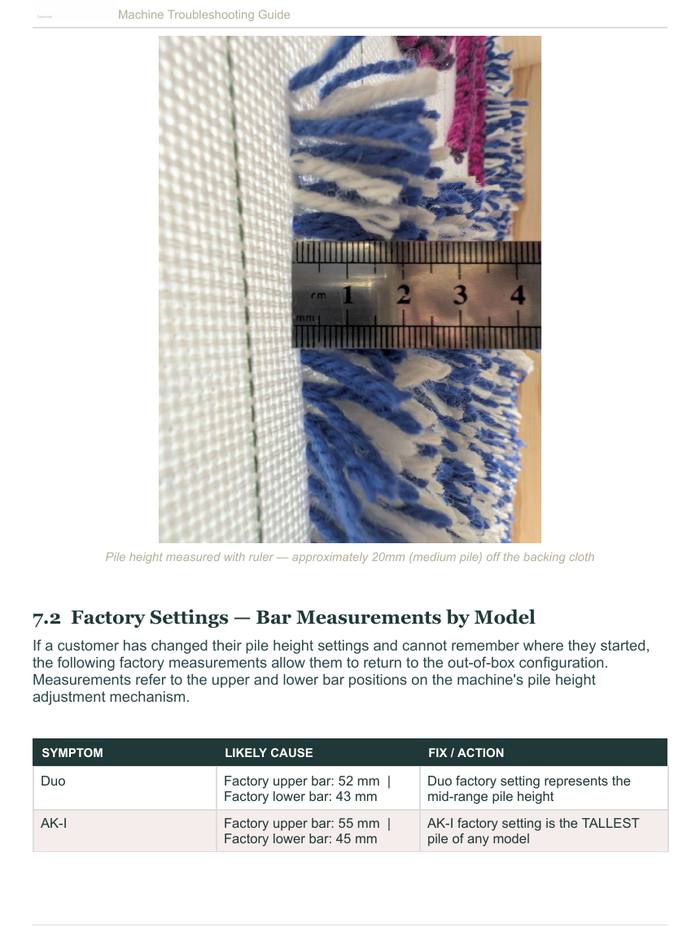
Pile height measured with a ruler: approximately 20mm (medium pile) off the backing cloth.
The grounding bars on the sides of the machine are related to your pile height settings. They tell the machine when to stop and return to its home position, so they affect how it behaves after you release the trigger. If your machine keeps running after you let go, or starts firing by itself, the grounding bars have most likely slid out of position.
If the machine still fires on its own after several adjustments, contact support@tufttheworld.com. We can have you send it in and set the grounding bars for you.
Newer DUO machines ship set to an even-numbered pile height, such as 14 mm, instead of the odd settings shown in some older videos. When you change pile height, stay on the same side of the gear your machine came set to. For example, a machine set at 14 mm should go down to 8 mm, not 9 mm. Every other step in the pile height video is exactly the same.
Before you adjust: Take photos, measurements or a video of your current setup so you can always return to where you started.
If you get stuck: Contact us and we can set up a video call to help. If you've made several adjustments beyond what the video shows, it's usually best to send the machine in so we can return it to factory settings.
See our 32 stock yarn colors, order a swatch card, and learn how custom-dyed yarn works: minimums, pricing, color matching, timing and mothproofing.
One of the most exciting things about tufting is that texture is a design element — not just a material property. Here's how to use it intentionally.
How to transfer a design to tufting cloth: draw freehand, trace, project or pounce, plus tips on mirroring, sizing detail and planning colors.